1. Overview
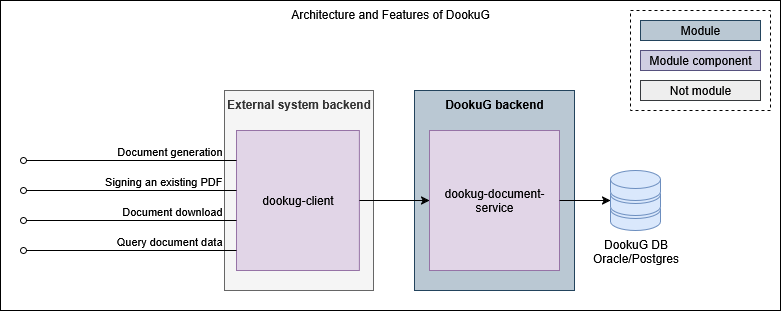
The DookuG module is a document generation module that creates PDF or plain text documents based on a given template.
Features:
-
Document generation in PDF or string format
-
based on HTML, XSLT, or plain string templates
-
with variable substitution
-
with optional electronic signature
-
-
Electronic signing of existing documents
-
Downloading generated documents
-
Retrieving metadata of generated documents
2. Functions
2.1. Document generation
The module is capable of generating documents in multiple ways. After generation, the module can also return the generated documents in gzip-compressed format.
Document generation consists of three steps. The table below shows which functions are available in each case:
| Phase | Function | Generator engine | ||
|---|---|---|---|---|
| SAXON | PDF_BOX | NONE | ||
| 1) Compilation | Can use template engine (Handlebars) | x | x | x |
| Supported template format | XSLT | HTML | STRING | |
| 2) Generation | Supported template source | DB, request | DB, request | DB, request |
| Generated document format | STRING | |||
| Digitally signing PDF | x | x | - | |
| 3) Storage | Storing in database (not recommended) | x | x | x |
2.1.1. Compilation
Handlebars is a templating engine used to generate documents by combining templates with data. It allows you to create dynamic content by embedding placeholders (called expressions) and handling template parameters within your templates, which get replaced with actual data when rendered. It also supports working with multiple and nested templates, making it easy to build complex views by composing smaller template parts. This clear separation of markup from logic improves maintainability and readability.
DookuG accepts parameters values in either key-value pairs or base64-encoded JSON format on the /generate endpoints.
A description of the available expressions can be found here.
2.1.2. Generation
2.1.2.1. Template source
The template source can be a template stored in the module’s database (in the TEMPLATE* tables). To identify the template, the request must include the referenced template’s name, language, and validity date. The system manages templates with different validity periods (past, current, future).
The guide for uploading templates to the database can be found here. If the template content changes during runtime, the /evict endpoint must be called to refresh the cache. This is not necessary when inserting a new template.
The template source can also be sent within the request in one of the following two formats:
-
Base64binary: The template and parameters are sent as base64-encoded text in the request. Parameters can be provided as key-value pairs or in JSON format.
-
Stream (multipart/form-data): The template is sent as a file on the endpoint, while the parameters are sent as text, also either as key-value pairs or in JSON format.
2.1.2.2. Electronic signature
When generating PDF documents, optional electronic signing is also available. The following data must be configured in the module settings for this purpose:
-
Signature profile (1-64 characters): The calling system can configure multiple signing profiles within the module. This allows different PDFs to be signed with different signatures. The signing key can be either RSA or ECDSA, which must be uploaded to the keystore and its path must also be specified in the module configuration. The document will be signed using this private key.
-
Signature name (1-30 characters), optional.
-
Signature reason (1-128 characters), optional.
In the document generation request, only the name of the signing profile needs to be specified. The other data will appear among the PDF signature details and should be obtained from the end customer.
2.1.3. Storage
Storing the generated document in the module’s database is a legacy feature and its use is not recommended. The calling system should forward the generated document received from DookuG to the DocStore module, which is designed for document storage and management. Therefore, endpoints that return only metadata should be avoided.
2.2. Signing an existing PDF
The signing function is also available on a separate endpoint for signing an existing PDF. It accepts the document to be signed in multipart format. The signing is performed based on the profile name specified in the request, according to the parameters defined in the configuration. The process runs synchronously, and the signed file is returned as part of the response.
2.3. Document download
Generated documents saved in the module database can be downloaded individually by their identifier. The response to the request returns the document in octet-stream format, as well as the file name. Upon request, the document can also be delivered in gzip-compressed format.
Storing the generated document is not recommended with the DookuG module. See: Storage
2.4. Query data
The metadata of generated documents can be queried in bulk in a filterable and sortable list, if they have been stored in the module database. The metadata includes: the file name, format, and status (DONE/FAILED).
Storing the generated document is not recommended with the DookuG module. See: Storage
3. Additional data
3.1. Electronic signature
In the case of digital signatures, the operation can be either certify or sign.
For example, if a certify signature is applied to a PDF document by an organization or authority, it ensures that the document is official and cannot be significantly modified. If only a sign signature is used, others may sign the document later, and it can still be modified to some extent, within certain restrictions.
| Properties | Certify | Sign |
|---|---|---|
Signature strength |
Stronger, used for authentication |
Normal signature |
Multiple signers |
Usually only one |
Multiple signers possible |
Document protection |
May restrict modifications |
Generally does not prevent further signatures |
Purpose of use |
Official authentication |
General digital signing |
3.2. Uploading templates to the database
Templates stored in the DookuG database support handling large content, validity periods, multilingual templates, and interrelated template structures.
TEMPLATE: This is the main table that stores the basic metadata of each template (e.g., name, validity period, language, etc.). If a template needs to be stored in multiple languages, then one record per language is required. This applies to both HTML and XSLT templates, regardless of whether the XSLT itself includes multiple languages. This is how DookuG determines in how many languages a given template is available.
TEMPLATE_PART: If a template is composed of multiple parts, this table helps distinguish between them, such as header, footer, body, etc. If the template consists of only one part, only one record is required in this table, regardless of language or template format.
TEMPLATE_TEMPLATE_PART: This is a linking table between the above two tables. There will be one record for each unique combination of language and template part.
TEMPLATE_PART_CONTENT: This table has a one-to-one relationship with TEMPLATE_PART and stores the actual template content as a BLOB, for performance reasons. It facilitates handling larger content and helps template caching. In the case of an HTML template, you must store one record for each language variant of each template part. For an XSLT template consisting of a single part, only one record is sufficient, as the structure itself may contain the multilingual content.
3.2.1. Example scenarios
Example scenarios for sample templates with various properties:
XSLT template - 3 languages, 1 template part
Template properties:
-
The XSLT template is available in 3 languages: English, Hungarian, and German
-
Consists of 1 main part
| Table | Records | Explanation |
|---|---|---|
TEMPLATE |
3 |
3 records corresponding to the 3 languages. |
TEMPLATE_PART |
1 |
Because there is one main part, regardless of language in the case of XSLT. |
TEMPLATE_TEMPLATE_PART |
3 |
Linking table: The template type must be linked to the records for all three languages. |
TEMPLATE_PART_CONTENT |
1 |
Because the XSLT template structure includes the language variations, one record for the main template part will be stored here for all 3 languages. |
XSLT template - 2 languages, 2 template parts
Template properties:
-
The XSLT template is available in 2 languages: English and Hungarian
-
Consists of 2 parts (header and body)
| Table | Records | Explanation |
|---|---|---|
TEMPLATE |
2 |
One for the English version and one for the Hungarian version — corresponding to the languages. |
TEMPLATE_PART |
2 |
For header and body — corresponding to the types, regardless of language in the case of XSLT. |
TEMPLATE_TEMPLATE_PART |
4 |
Linking table: The single Hungarian TEMPLATE record is linked to the 2 TEMPLATE_PART records, and the same is done for the English version. |
TEMPLATE_PART_CONTENT |
2 |
Because the XSLT template structure includes the language variations, one record per template part (header and body) will be stored here for both languages. |
HTML template - 3 languages, 1 template part
Template properties:
-
The HTML template is available in 3 languages: English, Hungarian, and German
-
Consists of 1 main part
| Table | Records | Explanation |
|---|---|---|
TEMPLATE |
3 |
3 records corresponding to the 3 languages. |
TEMPLATE_PART |
3 |
Because there is one main part per language. |
TEMPLATE_TEMPLATE_PART |
3 |
Linking table: The template type must be linked to the records for all three languages. |
TEMPLATE_PART_CONTENT |
3 |
3 records for all three languages. |
HTML template - 2 languages, 2 template parts
Template properties:
-
The HTML template is available in 2 languages: English and Hungarian
-
Consists of 2 parts (header and body)
| Table | Records | Explanation |
|---|---|---|
TEMPLATE |
2 |
One for the English version and one for the Hungarian version — corresponding to the languages. |
TEMPLATE_PART |
4 |
2 for the headers and 2 for the bodies — corresponding to the types per language. |
TEMPLATE_TEMPLATE_PART |
4 |
Linking table: The single Hungarian TEMPLATE record is linked to the 2 TEMPLATE_PART records, and the same is done for the English version. |
TEMPLATE_PART_CONTENT |
4 |
The header and body in Hungarian, and the header and body in English |
4. Release notes
v2.0.0
The first version of the documentation.
v2.1.0
The module can also return the generated documents in gzip-compressed format.